
iOS 底部 TabBar 安全区适配踩坑记
更新: 7/17/2026字数: 0 字 时长: 0 分钟
移动端 H5(Vue 3 + Vite + SCSS)中,iOS 设备底部 TabBar 与系统手势条重叠、固定定位滚动抖动的问题复盘。对应提交
934c76b。
一、前因与现象
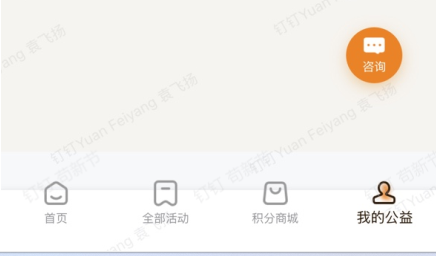
底部导航栏是 position: fixed 的根容器 .tab-bar,内部包一层 .tab-bar__safe 占位元素,安全区内边距最初加在这层内层元素上。iOS 真机上出现三类问题:
- 重叠:图标/文字与系统手势条(Home Indicator)区域重叠,易误触;
- 抖动:页面滚动或软键盘弹起时,
fixedTabBar 闪烁、轻微错位; - 高度联动失效:内容容器预留的底部内边距与 TabBar 实际高度对不齐。
问题图:
二、根因
- 安全区作用错了层:
padding-bottom: env(safe-area-inset-bottom)加在内部.tab-bar__safe上,fixed根容器本身没预留安全区高度,手势条区域无法被可靠覆盖为白色背景。 - 未开硬件加速:iOS Safari 对
fixed元素滚动时合成层处理保守,未显式提层导致重绘抖动。
安全区通过 mixin 封装(src/styles/mixins.scss):
scss
@mixin safe-area-bottom {
  padding-bottom: $safe-area-bottom; // 即 env(safe-area-inset-bottom)
}三、问题代码(修复前)
scss
/* ❌ 安全区在内层,fixed 容器未预留安全区、未开硬件加速 */
.tab-bar {
  position: fixed;
  left: 0;
  right: 0;
  bottom: 0;
  z-index: 100;
  display: flex;
  flex-direction: column;
  background-color: $color-white;
  border-top: 1px solid $color-border;
  /* 缺失:padding-bottom: $safe-area-bottom */
  /* 缺失:transform: translateZ(0) 硬件加速 */
}

.tab-bar__safe {
  @include safe-area-bottom;   /* ❌ 安全区内边距作用在内层占位元素 */
  display: flex;
  align-items: center;
  justify-content: space-around;
  height: 52px;
  box-sizing: border-box;
}四、修复方案
- 把安全区从
.tab-bar__safe上移到.tab-bar根容器; .tab-bar增加transform: translateZ(0)(含-webkit-前缀)开启硬件加速;- 内层
.tab-bar__safe只承载图标 + 文字(高度 52px),不再处理安全区; - 内容容器
padding-bottom: calc(52px + $safe-area-bottom)与 TabBar 实际高度精确对齐。
五、修复后代码(当前版本)
scss
.tab-bar {
  position: fixed;
  left: 0;
  right: 0;
  bottom: 0;
  z-index: 100;
  display: flex;
  flex-direction: column;
  justify-content: flex-start;
  background-color: $color-white;
  border-top: 1px solid $color-border;
  box-shadow: 0 -1px 4px rgba(0, 0, 0, 0.04);
  padding-bottom: $safe-area-bottom;   /* ✅ 安全区作用于 fixed 容器 */
  box-sizing: border-box;
  -webkit-transform: translateZ(0);    /* ✅ 硬件加速 */
  transform: translateZ(0);
}

.tab-bar__safe {
  display: flex;
  align-items: center;
  justify-content: space-around;
  height: 52px;                        /* ✅ 内容高度保持 52px */
  box-sizing: border-box;
}六、验证结果
- 图标 + 文字高度仍为 52px,无视觉回退;
- 手势条区域由
.tab-bar白色背景填充,不再重叠; - 滚动/软键盘弹起时 不再抖动;
- 内容容器底部内边距与 TabBar 实际高度精确匹配,无遮挡、无多余白底。
七、经验沉淀
- 安全区必须作用于
fixed根容器:固定层的安全区由其自身承载,内层 padding 无法可靠扩展固定层占位。 - 移动端
fixed必开硬件加速:transform: translateZ(0)(带前缀)低成本规避 iOS 滚动抖动。 - 高度联动用同一变量对齐:内容容器预留高度必须 = 「TabBar 内容高度 + 安全区」,两端共用
$safe-area-bottom防偏差。 - 职责单一:固定容器负责「安全区 + 硬件加速 + 背景」,内层只负责「内容布局」。
作者:gouxinjie · 适用技术栈:Vue 3 + Vite + SCSS + TypeScript